Product Badge

Office 365 Family for MAC

Delivery in 1 Sec.
Quick E-Mail Delivery

(56 Reviews)

When you buy Office 365 Family for Mac, you can activate Microsoft Office 365 Family on your Mac. Buy now and we’ll email your Office 365 Family for Mac key right away. Microsoft Office 365 Family can be used by up to six people. Each person in the subscription can install Microsoft Office 365 on all their devices and stay signed in on up to five devices at the same time.

Authentic Licenses
Invoice
Money Back Guarantee
Support 8:00–20:00 CET

Multi-discount:
4x or more — €110.41

€129.89
€200.00
(VAT included)
You Save:
€70.11
Discount:
35%

Payment & Security
apple pay icon google pay icon klarna icon sepa icon ideal icon visa icon mastercard icon maestro icon

Your payment is processed exclusively via encrypted SSL connections. Keyfy does not store or see any credit or bank details.

Secure Payment Methods
Brand 1 Brand 2 Brand 3 Brand 4 Brand 5 Brand 6
Four people in business attire gather around a laptop in a modern office, collaborating and smiling as they discuss work. Large windows and bright natural light fill the space.

Customer Reviews

Learn firsthand how our customers benefit from our products.

BUY OFFICE 365 FAMILY FOR MAC AND GET IT INSTANTLY

ALL OUR LICENSES INCLUDE LIFETIME GUARANTEE/SUPPORT!

When you buy Office 365 Family for Mac, you can activate Microsoft Office 365 Family on your Mac. Buy now and we’ll email your Office 365 Family for Mac key right away. Microsoft Office 365 Family can be used by up to six people. Each person in the subscription can install Microsoft Office 365 on all their devices and stay signed in on up to five devices at the same time.

With your Office 365 Family for Mac key, you can activate the software anywhere in the world. You can use it on your home or office computers. We offer affordable pricing and a lifetime guarantee on all activation licenses.

What is Office 365 Family for Mac?

Office 365 Family for Mac is a subscription-based version of Microsoft Office that gives you access to a suite of productivity apps, including Word, Excel, PowerPoint, Outlook, and more. This subscription is designed for families and households, and it allows up to six people to install and use these apps across multiple devices. That means you get the flexibility to work, communicate, and collaborate efficiently—so you can stay productive.

Which apps are included in a Microsoft Office 365 Family for Mac license?

Microsoft Office (also known as the Office suite) includes a wide range of apps, each built for specific tasks to help you boost productivity and streamline your workflow. While exact components can vary by version and edition, most Office 365 for Mac licenses include the following key programs:

  • Word: A word processing app for creating and editing documents.
  • Excel: A spreadsheet app for analyzing data and building tables and charts.
  • PowerPoint: Presentation software for creating impressive slide decks.
  • Outlook: An email and calendar app to manage communication and schedules.
  • OneNote: A digital notebook app for organizing notes and ideas.

Office 365 Family for Mac – digital license with instant activation

If you prefer a one-time license without a subscription, Office 2019 Home & Student for Mac is an excellent option. It includes proven Office apps like Word, Excel, and PowerPoint—without recurring costs. Ideal for users who don’t need cloud services and want to use their software long-term without ongoing payments.

Microsoft Office 365 Family for Mac key – Word, Excel, PowerPoint & Outlook for 6 users

Benefits of Microsoft Office 365 Family for Mac:

  • Multiple apps: Office 365 Family for Mac gives you access to a broad range of productivity apps, including Word, Excel, PowerPoint, and Outlook, just to name a few. This helps you handle a wide variety of tasks and needs.
  • Multiple devices: With an Office 365 Family for Mac subscription, you can install the apps on multiple Mac devices—ideal for families. Use it on MacBooks, iMacs, and other Apple devices.
  • Cloud storage: Each user in your Office 365 Family for Mac subscription gets 1 TB of OneDrive cloud storage, making it easy to store files securely and access them from anywhere.
  • Regular updates: Office 365 Family for Mac includes ongoing updates for the apps, so you stay current and receive the latest features and security improvements.
  • Additional services: Along with the core apps, you may also get access to additional services such as Skype minutes for international calls and enhanced security features to help protect your data.
  • Made for the whole family: Office 365 Family for Mac is designed for shared use and customization across multiple users. If you don’t need to share Microsoft Office with multiple people and want a single-user option, Office 365 Personal for Mac is a great alternative. It includes the same apps as the Family edition, but for one person who can use Office across multiple devices. With 1 TB of OneDrive storage and regular updates, you still get all the benefits of Microsoft Office—without extra licenses for additional users.
  • Support and training: Office 365 Family for Mac includes online support and training resources to help users with questions or issues.

Buy Office 365 Family for Mac

If you want to buy Office 365 Family for Mac, follow these steps:

  1. Once you’re in the store, use the search bar to find “Office 365 Family for Mac.” Click it to open the product page.
  2. Click “Buy” to add the product to your cart.
  3. Proceed to checkout.
  4. Complete the payment process. You can pay by credit/debit card, Apple Pay, Google Pay, Klarna or SEPA Direct Debit.
  5. After purchase, you’ll receive an email that includes your 365 Family for Mac key, full instructions, and a download link.

Keep your Office 365 Family for Mac key safe—you’ll need it to activate the software after installation.

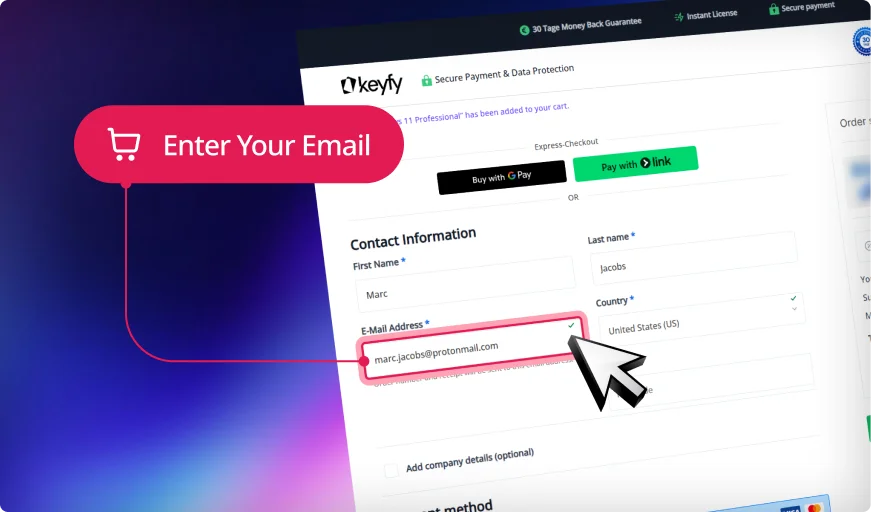
A website checkout form asks for customer information. A pink pop-up with a shopping cart icon points to the email address field, highlighting it with the text Enter Your Email. The background features a purple gradient.

Step 1: Enter Correct Email

We will securely send your product key, download link, and activation instructions. An invoice for your purchase will also be included.

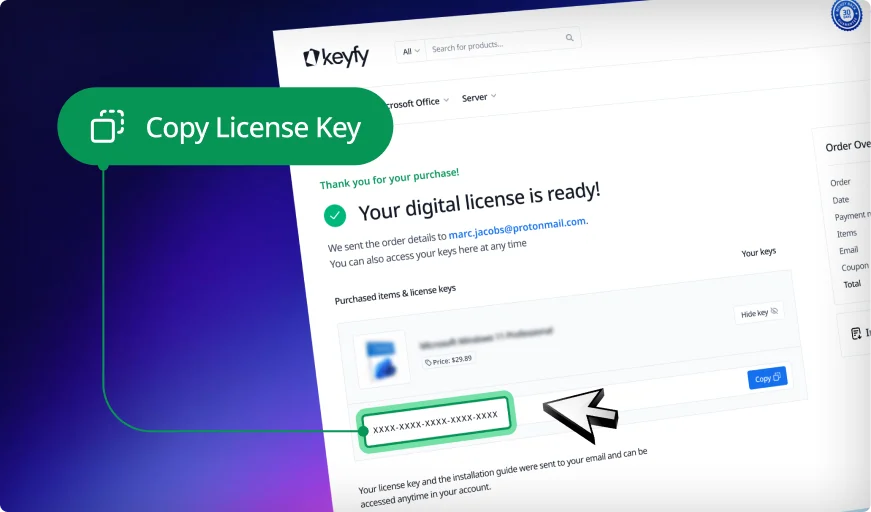
A computer screen displays an email from Keyfy with the subject Your digital license is ready. A green popup with an arrow points to a license key and says, Copy License Key.

Step 2: Instantly Access Your Key

Your license key appears instantly on the thank you page and in your account. You can download and install the software right away.

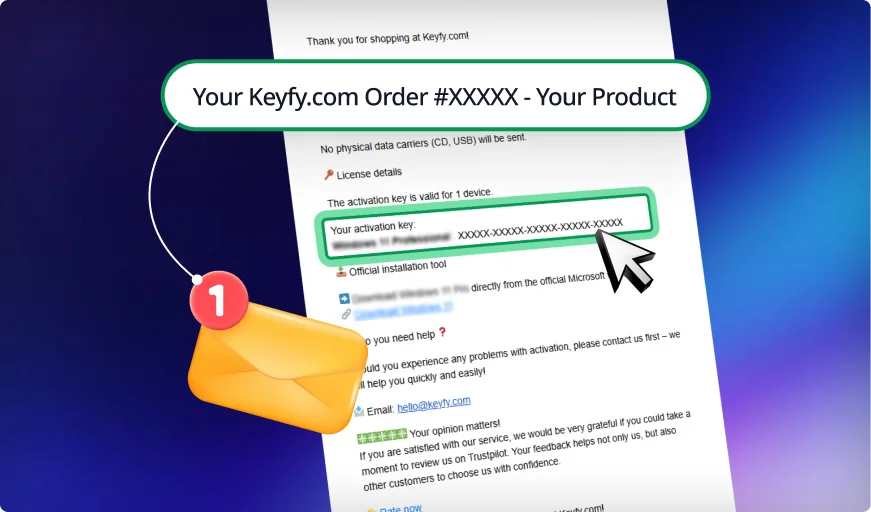
A confirmation email from Keyfy.com displays an order summary with an activation key, a yellow envelope icon, and a notification badge on a blue and purple gradient background.

Step 3: Check Your Inbox

We also email the key and instructions for safekeeping. This ensures you always have a secure backup copy in your inbox.

The image shows the word keyfy in bold, modern black font, next to an abstract, overlapping geometric logo with gradient colors transitioning from blue to green.

Your Trusted Partner for Genuine Software Licenses

A person holding a laptop stands outside a modern glass building at sunset. Various trust badges, including Trustpilot, Trusted Shops, Microsoft Reseller, and seals of authenticity, are overlaid with the Keyfy logo.

Genuine & EU-Compliant: Software
Licenses with Top Ratings

Trusted by 300,000+ Customers. With a 4.8/5 star rating and thousands of verified reviews on Trustpilot and Trusted Shops, you can buy with confidence. As an independent reseller, we sell only genuine, legally sourced licenses, resold in line with EU law (CJEU ruling C-128/11, UsedSoft v. Oracle) and backed by Trusted Shops buyer protection.

Instant Delivery
& 30-Day Guarantee

As soon as your payment is confirmed, your license key appears right on your screen and arrives by email with the official download link and an activation guide. If something isn't right, our 30-day money-back guarantee has you covered.

Two people interact with futuristic digital screens at a desk. The Keyfy logo is on the top left, while icons for fast delivery, an email notification, and a 30-day money-back guarantee badge appear on the right.
A man with curly hair and glasses works on a laptop in a modern office. He wears an Okefy hoodie. Icons highlight top-rated service, fast expert help, and over 300,000 customers. Other people work in the background.

Pay Once, Use It for Good
& Real Support

One-time-purchase products such as Office 2024 and Windows 11 come with a perpetual license: no subscription, no expiry. Subscription products such as Microsoft 365 run for the term shown on the product page. Need help installing or activating? Our English-speaking support team is here every day from 8:00 to 20:00 (CET).

Pay Your Way &
Get a Full VAT Invoice

Pay by card, Apple Pay, Google Pay, Klarna, SEPA Direct Debit or one of many local methods such as iDEAL and Bancontact. Every order comes with a VAT invoice, ready for your company's accounting.

A smiling man in a suit uses a laptop displaying Windows 11. Nearby, icons for various payment methods and banks appear on screen, with a cursor pointing to them. Text reads “Activation Guarantee.”.
A laptop displaying a colorful screen sits on grass in front of wind turbines and solar panels. Three icons below read: 100% Digital, No Shipping Needed, and Instant Digital Delivery.

Digital Delivery, Zero Packaging

Everything is delivered by email: no boxes, no shipping, no plastic. It is faster for you and lighter on the planet.

Secure Checkout & Data Protection

Your connection is SSL-encrypted, and payments are processed by Stripe, a certified payment provider, so your full card details never touch our servers. We handle your personal data in line with GDPR.

A payment processing screen shows a green shield icon with a lock and the message Payment is being processed. Logos for security and payment providers appear below, with a blurred office background behind the message box.

30-Day Money-Back Guarantee

Not what you expected? Contact us within 30 days of purchase for a full refund, as set out in our money-back guarantee.

A woman sits at a desk working on a computer, with a small plant beside her monitor. A blue “30 days money back guarantee” badge is displayed in the lower right corner of the image.

Delivery

A website checkout form asks for customer information. A pink pop-up with a shopping cart icon points to the email address field, highlighting it with the text Enter Your Email. The background features a purple gradient.

Step 1: Enter Correct Email

We will securely send your product key, download link, and activation instructions. An invoice for your purchase will also be included.

A computer screen displays an email from Keyfy with the subject Your digital license is ready. A green popup with an arrow points to a license key and says, Copy License Key.

Step 2: Instantly Access Your Key

Your license key appears instantly on the thank you page and in your account. You can download and install the software right away.

A confirmation email from Keyfy.com displays an order summary with an activation key, a yellow envelope icon, and a notification badge on a blue and purple gradient background.

Step 3: Check Your Inbox

We also email the key and instructions for safekeeping. This ensures you always have a secure backup copy in your inbox.

Installation

Download the software:

Download the software using the provided link.

Install the software:

Install the software by following the on-screen instructions.

Activate the software:

Activate the software using the provided license key.

Enjoy your new software!

More detailed instructions will be sent to you by email after purchase.

System Requirements

For the best experience with Microsoft Office 365 Family, the following system requirements are recommended:

  • Operating system: macOS 10.13 or later
  • Processor: A Mac computer with an Intel processor (Apple Silicon M1 Macs are supported via a universal app that runs natively on both Intel-based and Apple Silicon–based Macs)
  • Memory (RAM): 4 GB RAM or more
  • Storage: 10 GB of available disk space
  • Display: A Mac with a display resolution of 1280 x 800 or higher
  • Graphics: Hardware graphics acceleration requires compatible graphics hardware.

Fragen und Antworten

How do I install Office 365 Family on my Mac?

To install Office 365 Family on your Mac, follow these steps:
a. Sign in to the Microsoft account linked to your Office 365 Family subscription.
b. On your account dashboard, find the “Install Office” option. Select “Install.”
c. Follow the on-screen instructions to download the Office installer for Mac.
d. Once the download is complete, open the installer and follow the installation instructions.
e. Sign in with your Microsoft account when prompted to activate your subscription.
After these steps, Office 365 Family will be installed on your Mac, and you can use it across multiple devices.

Can I share my Office 365 Family subscription with other family members on Macs?

Yes, you can share your Office 365 Family subscription with other family members, including those using Macs. Office 365 Family lets you share your subscription with up to six family members. Each family member can have their own Microsoft account and install Office apps on their own Macs or devices. You can manage sharing and family members through your Microsoft account settings.

How do I renew my Office 365 Family subscription on my Mac?

To renew your Office 365 Family subscription on your Mac, follow these steps:
a. Open any Office app (for example, Word, Excel, or PowerPoint) on your Mac.
b. In the app, click “Help” in the menu bar.
c. Select “Check Account” or “Check for Updates” (wording may vary depending on your Office version).
d. If your subscription is close to expiring, you’ll see an option to renew. Click it.
e. Follow the instructions to renew your subscription, and enter your payment information if needed.
Alternatively, you can renew your Office 365 Family subscription through your Microsoft account on the official Office website.

Join a Community Built on
Trust and Quality

We don’t compromise when it comes to customer service. At Keyfy, we work exclusively with official providers to guarantee the highest quality for every customer. And it seems our customers agree — with over 5000+ 5-star reviews. Discover why so many choose Keyfy as their #1 source for genuine software licenses.

  • Excellent
    2000+ reviews on
  • |
  • Excellent
    5000+ reviews on
  • |
  • Excellent
    50+ reviews on
  • |
  • Excellent
    2000+ reviews on
  • PreisPreis
  • PreisAuthenticity
  • DeliveryDelivery
  • Customer supportCustomer support
  • GuaranteeGuarantee
  • Security Security
  • User-friendlinessUser-friendliness
  • PreisReputation
  • InvoiceInvoice
  • Affordable and transparent – ​​no hidden fees
  • 100% original licenses, guaranteed
  • Instant digital delivery directly after purchase
  • We are addicted to 5-star reviews.
  • Full 30-day money-back guarantee
  • Platform for secure, encrypted payments
  • Simple and straightforward license activation process
  • We are addicted to 5-star reviews.
  • Invoice with VAT? Guaranteed with us!
5 Sterne Trustpilot-Bewertung4.90
Shop now
  • Brands on Ebay
  • Cheap, but you'll have to buy it again next month.
  • Uncertain – Many questionable products
  • It can take hours or days to obtain the license.
  • No consistent support – it depends on the seller.
  • A refund is practically impossible.
  • High risk from unverified sellers
  • Often unclear instructions
  • Usually sellers without a reputation
  • Good luck with that!
  • Other Websites
  • It should work.
  • Unclear authenticity, no guarantees
  • Delivery times vary, often unreliable.
  • Does not speak English and has long waiting times.
  • Refunds or guarantees are rare.
  • Unclear payment methods
  • They will probably succeed
  • It varies, some are okay.
  • Invoices are usually not available.

Related Products

-78% OFF
(93 Reviews)
Original price was: €125.00.Current price is: €27.89. VAT included
-86% OFF
(168 Reviews)
Original price was: €105.00.Current price is: €14.89. VAT included
-80% OFF
(84 Reviews)
Original price was: €149.90.Current price is: €29.89. VAT included
-86% OFF
(134 Reviews)
Original price was: €70.00.Current price is: €9.89. VAT included
-85% OFF
(156 Reviews)
Original price was: €85.00.Current price is: €12.89. VAT included
-84% OFF
(85 Reviews)
Original price was: €59.99.Current price is: €9.89. VAT included
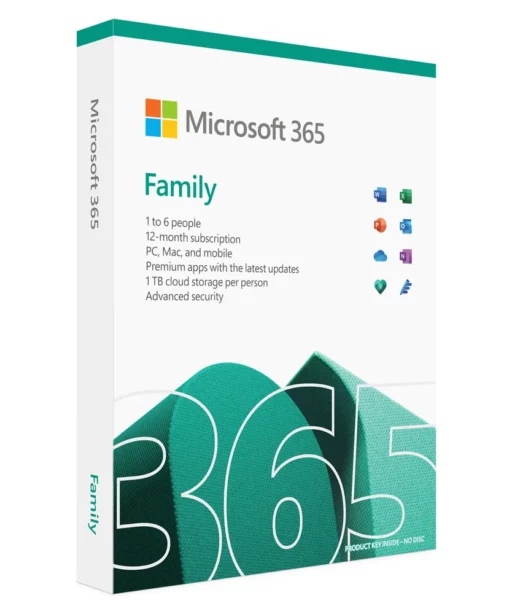
Microsoft 365 Family software box featuring branding, Office app icons, and key features: 1 to 6 people, 12-month subscription, PC/Mac/mobile including Office 365 Family for MAC, premium apps, 1TB cloud storage each, and advanced security.
Office 365 Family for MAC
€200.00 €129.89