





 Nederlands
 Italiano
 Português
 Română
 Español
 Ελληνικά
 Polski
 Türkçe


Error 0xC004F213 appears when Windows cannot find a valid activation key or the digital license no longer matches your device – often after a hardware change (e.g., motherboard) or a fresh installation.
No time? Re-enter your product key and run the Activation Troubleshooter. If that doesn’t help, follow the full guide below.
Causes of 0xC004F213
-
Changed hardware (motherboard, CPU, drive) interrupts the activation tied to the device ID.
-
New installation without re-entering the original key.
-
Microsoft account is not linked to the digital license.
-
Wrong edition or key already used on another device (e.g., Home key on Pro installation).
Quick Solutions (Recommended Order)
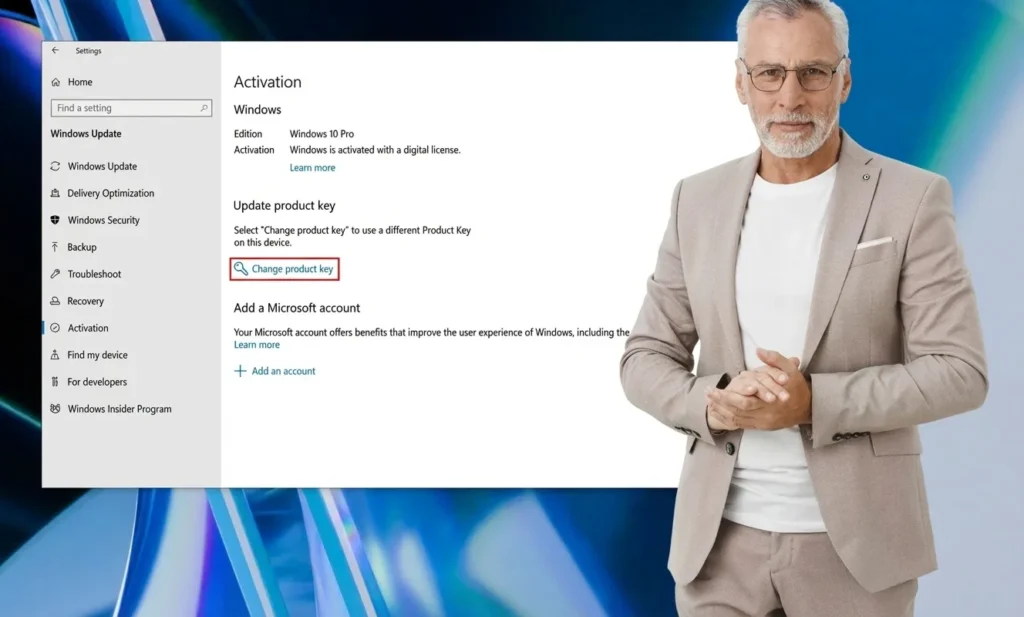
1) Re-enter Product Key
-
Open Settings → Update & Security → Activation.
-
Select Change product key and enter the 25-character key.
-
Confirm and wait for online activation.
2) Run Troubleshooter
-
Settings → Update & Security → Activation → Troubleshoot.
-
Windows looks for typical activation problems and fixes them automatically.
-
If prompted, sign in with your Microsoft account to re-link the digital license.
3) Check Edition
Does your edition match the key (e.g., Pro vs. Home)? If not, activation will fail. Adjust the edition if necessary or use a matching key. You can find matching versions in our Windows 11 category and Windows 10 offers.
4) Reactivate After Hardware Change
For major hardware changes:
-
Sign in with the same Microsoft account as before.
-
Select Activation → Troubleshoot → I changed hardware on this device recently and follow the instructions.
5) Nothing worked? Activate with a new original key
If activation still fails, a new, original Microsoft® Windows® product key is the fastest way. Here you can find Windows 11 Pro or Windows 10 Pro – activation in just a few minutes (instant email delivery).
Step-by-Step (Details)
Re-enter Product Key
-
Win + I → Update & Security → Activation → Change product key → Enter key → Next.
-
Restart Windows if necessary.
Activation Troubleshooter
-
Settings → Update & Security → Activation → Troubleshoot.
-
Run through the wizard completely; re-enter key if necessary.
Link Digital License
-
In Activation, ensure that your Microsoft account is signed in and “Windows is activated with a digital license linked to your Microsoft account” is displayed. If not, sign in and run Troubleshoot again.
When should I buy a new license?
-
Switching to a completely different PC (non-transferable OEM license).
-
Previous key is invalid/blocked or assigned to another device.
-
Edition change requires a matching key (e.g., to Windows 11 Pro).
Browse our Windows licenses. Delivery is instant and digital after purchase.
Personal Support – Daily from 8:00 AM – 8:00 PM
Our team supports you 7 days a week with installation and activation – via chat or email. We guide you step by step.
-
30-day money-back guarantee if a problem cannot be solved.
-
Trusted Shops Buyer Protection and over 300,000 customers trust Keyfy.